
Installing HP Records Manager web components on Windows 10
I recently got a Microsoft Surface Pro 4 as my main development machine, and as such I wanted to install a HPE RM server, and also the Web Client and Service API. However, Windows 10 is not supported by RM 8.3, and so I received this message:
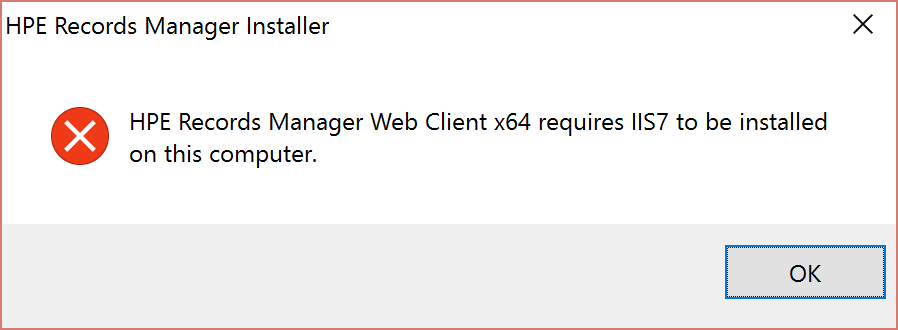
I wasn’t going to let that stop me! Here’s what I did to get it working.
WARNING: Setting up RM 8.3 on Windows 10 is not supported by HPE (nor me by the way). That means you’re on your own if something goes wrong. I’m doing this for development purposes only.
All you need to do is make a change in the registry to trick the HP RM installer into thinking you have a valid IIS version. Please note that you modify the registry at your own risk. Do be careful. Open RegEdit and navigate to HKEY_LOCAL_MACHINE\SOFTWARE\Microsoft\InetStp
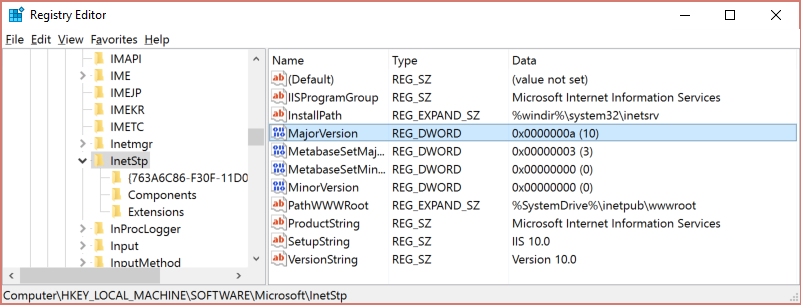
I made a backup of that key, just to be safe, and you should too! (Right-click on InetStp and click Export).
Then, change the value of MajorVersion from 10 to 9 (making sure you’ve selected Decimal instead of Hexidecimal).
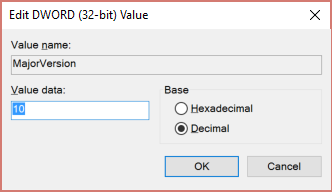
Now simply run the Setup_HPE_RM_x64.exe as Administrator, and select the web components you want to install. It should sail on through with no IIS related errors.
Once it’s completed, be sure to change the value of MajorVersion back to 10, with Decimal selected. And that’s it. All done.
Happy Records Managing!
Matt
REMINDER: The HPE RM 8.3 web components are not supported on Windows 10, and you modify the registry at your own risk.
